


What Makes a WordPress Website “Poorly Built”
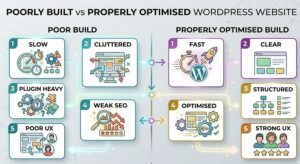
A poorly built WordPress website is not always obvious at first glance.
It may look acceptable visually, but performance tells a different story.
One of the most common issues is slow performance. Heavy themes, unoptimised images and poor hosting can significantly affect loading speed. This creates a poor user experience and reduces engagement.
Cluttered design is another problem. Too many elements competing for attention make it difficult for users to focus. Instead of guiding visitors, the site creates confusion.
Plugin overload is a frequent issue. Adding multiple plugins to solve different problems can create conflicts and slow down the website.
Weak SEO setup also limits visibility. Without proper structure, metadata and internal linking, the website struggles to rank in search results.
Mobile experience is often overlooked. If the site does not function well on smaller screens, a large portion of users will have a poor experience.
User journeys can also be unclear. Visitors may not know where to go or what to do next, which reduces conversions.
Finally, backend management can become difficult. If updating content requires technical knowledge, the site is less likely to stay current.
A website does not need to have all of these issues to be considered poorly built. Even a few can significantly affect performance.
Common Signs Your WordPress Website Needs Fixing
Most business owners already have a sense that something is not working.
The challenge is identifying whether the website is the cause.
One clear sign is a high bounce rate. Visitors arrive and leave quickly without engaging with the site.
Low enquiries are another indicator. Traffic may be steady, but conversions remain inconsistent.
Slow loading pages are often noticeable, especially on mobile devices. This directly affects user experience.
Frequent errors or bugs suggest underlying technical issues. Forms may fail to submit or pages may not display correctly.
If updating content feels difficult, the backend setup may be too complex.
Poor Google rankings can also point to structural SEO issues.
Individually, these problems may seem manageable. Together, they indicate that the website is not performing as it should.
Step by Step: How to Fix a Poorly Built WordPress Website
Fixing a WordPress website properly requires a structured process. Skipping steps or making random changes often leads to more problems.
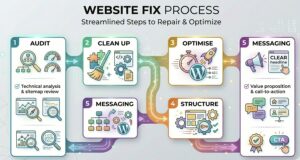
Step 1. Audit the Website Properly
Before making any changes, you need a clear understanding of what is wrong.
This includes reviewing technical performance, user experience and SEO structure.
An audit highlights where issues exist and which ones have the biggest impact.
Without this, fixes are based on guesswork.
Step 2. Clean Up Plugins and Theme
Once issues are identified, the next step is to simplify the setup.
Remove unnecessary plugins. Replace outdated or poorly coded tools. Ensure the theme is stable and suitable for your needs.
Reducing complexity improves both performance and reliability.
Step 3. Improve Site Speed and Performance
Speed optimisation is essential.
This involves compressing images, improving hosting and reducing unnecessary code. Caching and performance tools can also help.
A faster website improves user experience and supports better search rankings.
Step 4. Fix Structure and Navigation
Your website should be easy to navigate.
Pages should be organised logically. Navigation should be clear and consistent. Users should be able to find what they need without confusion.
A well structured site supports both usability and SEO.
Step 5. Improve Messaging and Content
Even a technically strong website can underperform if the messaging is unclear.
Visitors should understand what you do and who you help within seconds.
Content should focus on benefits, not just features. Calls to action should guide users toward the next step.
Step 6. Optimise for Mobile
A large percentage of website traffic in the UK now comes from mobile devices.
If your WordPress website is not properly optimised for mobile, it will struggle to convert visitors.
This is not just about resizing content. It is about designing for how people actually use their phones.
Buttons need to be easy to tap. Text should be readable without zooming. Forms should be simple to complete.
Navigation should be clear and accessible with minimal effort.
If mobile users encounter friction, they leave. Improving mobile experience is one of the fastest ways to improve conversions.
Step 7. Strengthen SEO Foundations
Once structure and performance are improved, the next step is to fix SEO foundations.
This includes ensuring each page has clear titles and descriptions. Content should be structured logically with proper headings.
Internal linking should guide both users and search engines through the site.
Technical elements such as indexing, sitemap setup and schema should also be considered.
SEO is not just about adding keywords. It is about creating a website that search engines can understand and rank properly.
When a Fix Is Not Enough and a Rebuild Is Needed
Not every WordPress website can be fixed effectively.
In some cases, the underlying foundation is too weak.
An outdated theme or poorly coded framework can limit what is possible. Even after optimisation, performance may remain inconsistent.
If the website structure is fundamentally flawed, improving it may require more effort than starting again.
Scalability is another factor. If the platform cannot support future growth, continuing to patch issues will create ongoing problems.
Repeated technical issues are also a sign that deeper changes are needed.
A rebuild allows you to start with a clean, structured foundation. It removes accumulated issues and provides a better base for long term growth.
The key is knowing when to stop fixing and start rebuilding.
The Role of a WordPress Consultant in Fixing Websites
This is where many businesses take the wrong approach.
They try to fix issues one by one. A plugin for speed. A tweak for design. A quick SEO update.
The result is temporary improvement, but not long term stability.
A WordPress consultant approaches the problem differently.
Instead of focusing on individual issues, they look at the website as a whole.
They identify root causes, not just symptoms. They assess structure, performance, user experience and business goals together.
This allows them to prioritise changes based on impact.
Rather than guessing, they provide a clear roadmap.
A consultant also ensures that fixes align with how the business operates. The website is not just improved technically, but strategically.
This prevents the same problems from returning.
For businesses that rely on their website for leads and growth, this approach is far more effective than reactive fixes.
Common Mistakes When Trying to Fix WordPress Websites
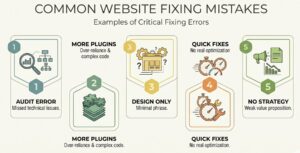
Many businesses attempt to fix their website but end up making the situation worse.
One common mistake is adding more plugins instead of solving the underlying issue. This increases complexity and often introduces new problems.
Focusing only on design is another issue. A visual update may improve appearance, but it does not address performance or structure.
Ignoring performance is costly. Speed and usability have a direct impact on conversions.
DIY fixes without a clear plan often lead to inconsistent results. Without understanding the full picture, changes can conflict with each other.
Hiring cheap developers for quick fixes can also create problems. Short term solutions rarely address deeper issues.
Avoiding these mistakes helps ensure that improvements are meaningful and lasting.
How Design Hero Fixes Poorly Built WordPress Websites
Fixing a WordPress website properly requires more than technical adjustments. It requires a clear strategy.
Design Hero approaches WordPress projects as a consultancy, not just a development task.
The process begins with a full audit. This identifies performance issues, structural weaknesses and missed opportunities.
From there, improvements are prioritised based on impact. The focus is on changes that directly improve user experience and conversions.
Performance is optimised through cleaner code, better hosting setup and reduced complexity.
Structure and navigation are refined to make the site easier to use.
Messaging is aligned with business goals, ensuring visitors understand what the business offers and what action to take.
Everything is built with scalability in mind, so the website can grow without requiring constant fixes.
You also work with a single point of contact, which keeps communication clear and consistent.
For businesses across Glasgow and the UK, this approach provides a reliable path from underperforming websites to high performing assets.
Want to know what can be improved in your WordPress website – Book a Free Consultation call
WordPress Fix Checklist
If you want to quickly assess your current website, use this checklist as a guide.
- Is your website loading quickly across devices
- Is the navigation clear and easy to follow
- Are plugins limited and well managed
- Does the site work smoothly on mobile
- Is your messaging clear within a few seconds
- Are users guided toward clear actions
- Is your SEO structure properly set up
- Can you update content easily
- Does the site feel stable and secure
- Is your website generating enquiries consistently
If several of these areas are not performing well, your website likely needs more than minor adjustments.
Conclusion
A poorly built WordPress website does not just affect how your business looks. It affects how it performs.
Slow pages, weak structure and unclear messaging all reduce your ability to generate enquiries and grow.
The instinct for many businesses is to patch problems as they appear. But this approach rarely delivers long term results.
Fixing a WordPress website properly requires a clear understanding of what is wrong and a structured plan to improve it.
In some cases, small improvements are enough. In others, deeper changes or a rebuild may be required.
The key is to focus on the underlying issues, not just the visible symptoms.
If your website feels slow, difficult to manage or ineffective, it is likely holding your business back.
Design Hero works with businesses across Scotland and the UK to fix WordPress websites properly, focusing on performance, structure and conversion.
A website should support your growth, not limit it.